

Integrating a Bub Agent with FastAPI
With the basics of the Bub SDK behind us, this section introduces no new concepts. Instead, it ties everything together in one complete example that builds a working Agent demo application.
The complete example lives in bub-todo-agent. You can download it and modify it yourself, or build along with the tutorial. The core files are laid out like this:
Directorybub-todo-agent/
- main.py # the focus of this chapter
- index.html # demo UI, not covered here
Directorystatic/
- uno.global.js
- alpine.min.js
Directorysessions/ # created automatically at runtime
- …
1. Configure the Agent and start the FastAPI service
Section titled “1. Configure the Agent and start the FastAPI service”First, let’s set up the application skeleton: configure the Bub Agent and create it when FastAPI starts. That means:
- Import the dependencies and load configuration into variables.
- Customize FastAPI’s lifespan logic so the Bub Agent is configured at startup.
#!/usr/bin/env -S uv run --script# /// script# requires-python = ">=3.12"# dependencies = [#   "bub @ git+https://github.com/bubbuild/bub@main",#   "fastapi>=0.135",#   "python-dotenv",#   "uvicorn",# ]# ///
import asyncioimport loggingimport osfrom collections import defaultdictfrom collections.abc import AsyncIterable, Awaitable, Callablefrom contextlib import asynccontextmanager, suppressfrom itertools import countfrom pathlib import Pathfrom typing import Literalfrom uuid import uuid4
import republicfrom dotenv import load_dotenvfrom fastapi import FastAPI, HTTPException, Requestfrom fastapi.sse import EventSourceResponse, ServerSentEventfrom pydantic import BaseModel, Field
from bub.core import Agentfrom bub.core.events import ToolCallDecision, ToolCallFinished, ToolCallStartedfrom bub.core.store import FileTapeStorefrom bub.core.tools import tool

logger = logging.getLogger(__name__)BASE_DIR = Path(__file__).resolve().parent
load_dotenv()
# ===== Override with environment variables or .env, or edit these defaults directly =====MODEL = os.getenv("BUB_MODEL", "openai:gpt-4o-mini")BASE_URL = os.getenv("BUB_API_BASE", "https://api.openai.com/v1")API_KEY = os.getenv("BUB_API_KEY") or os.getenv("REPUBLIC_OPENAI_API_KEY")HOST = os.getenv("BUB_HOST", "127.0.0.1")PORT = int(os.getenv("BUB_PORT", "8000"))# ==========================================================

@asynccontextmanagerasync def lifespan(app: FastAPI):    async with republic.get_model(MODEL, api_base=BASE_URL, api_key=API_KEY) as model:        agent = Agent(            store=FileTapeStore(BASE_DIR / "sessions"),            system_prompt=(                "You are a personal todo assistant. Always use tools to read or change todos; "                "never guess task state. If a request is ambiguous, look it up or ask the user "                "first, and respect tool errors and denial reasons."            ),            max_steps=6,        )
        app.state.model = model        app.state.agent = agent        app.state.session_locks = defaultdict(asyncio.Lock)        # request_id -> future; the delete hook waits here, and POST /chat/confirm wakes it.        app.state.pending_confirms = {}        yield

app = FastAPI(title="Bub Todo Agent", lifespan=lifespan)
Notes:
- To avoid creating the Agent repeatedly and to share one instance, mount the created Agent and its related attributes on FastAPI’s state object,
app.state. max_stepscaps how many steps a single Run can take, preventing the model from looping forever.- The
storeparameter gives the Agent Tape capabilities, so it can remember the conversation across turns.
For now this is still a very basic setup: the model can only answer. Next we’ll give it the ability to do real work.
2. Give it business capabilities through tools
Section titled “2. Give it business capabilities through tools”Now that the Agent is in place, let’s make it actually useful: every Todo operation becomes a Python function wrapped as a tool that the Agent can call. That means:
- Store task data in a Python dictionary.
- Provide the usual create, read, update, and delete operations so the Agent can view, add, complete, and delete tasks.
# ...
from itertools import count
from pydantic import BaseModel, Field
from bub.core.tools import tool
TASKS: dict[str, dict[str, object]] = {}TASK_IDS = count(3)

@tooldef list_tasks() -> list[dict[str, object]]:    """List every todo with its task ID, title, and completion state."""    return [dict(task) for task in TASKS.values()]

class AddTaskInput(BaseModel):    title: str = Field(min_length=1, max_length=100, description="Short, specific todo title")

@tool(name="add_task", model=AddTaskInput)def add_task(param: AddTaskInput) -> dict[str, object]:    """Add a new incomplete todo."""    task_id = f"task-{next(TASK_IDS)}"    task = {"task_id": task_id, "title": param.title, "completed": False}    TASKS[task_id] = task    return dict(task)

@tooldef complete_task(task_id: str) -> dict[str, object]:    """Mark a todo complete by task ID. Call list_tasks first if the ID is unknown."""    if task := TASKS.get(task_id):        task["completed"] = True        return dict(task)    return {"task_id": task_id, "error": "task_not_found"}

@tooldef delete_task(task_id: str) -> dict[str, object]:    """Permanently delete a todo by task ID. The host must authorize it first."""    if task := TASKS.pop(task_id, None):        return {"task_id": task_id, "status": "deleted", "title": task["title"]}    return {"task_id": task_id, "error": "task_not_found"}
The code above is fairly basic Python, so we won’t go through it line by line. In short:
- The function’s docstring and type annotations become the tool schema. The Agent reads them before deciding whether to call the tool.
- Return values must be JSON-serializable. Return
{"error": ...}for business failures; don’t throw exceptions and abort the whole flow for every failure. delete_taskis irreversible, so we’ll add an interception event later to require a second confirmation.
Now update the Agent configuration:
# Code snippet..
@asynccontextmanagerasync def lifespan(app: FastAPI):
    # ...
    async with republic.get_model(MODEL, api_base=BASE_URL, api_key=API_KEY) as model:        agent = Agent(            store=FileTapeStore(BASE_DIR / "sessions"),            tools=[list_tasks, add_task, complete_task, delete_task],            system_prompt=(                "You are a personal todo assistant. Always use tools to read or change todos; "                "never guess task state. If a request is ambiguous, look it up or ask the user "                "first, and respect tool errors and denial reasons."            ),            max_steps=6,            max_tool_concurrency=2,        )
Here we pass all task tools in tools and set max_tool_concurrency to cap how many tools can run at once.
3. Wrap Agent calls
Section titled “3. Wrap Agent calls”The Bub Agent now has tools — its “hands and feet” — and can interact with the user.
Before calling it, we may want to do some light argument handling so each Run receives correct arguments. Our logic here is simple:
ConfirmDelete = Callable[[dict[str, object]], Awaitable[bool]]

class ChatRequest(BaseModel):    session_id: str = Field(pattern=r"^[A-Za-z0-9_-]{1,64}$")    prompt: str = Field(min_length=1, max_length=10_000)    think_level: Literal["auto", "low", "medium", "high"] = "auto"

def run_agent(agent: Agent, model, req: ChatRequest, confirm_delete: ConfirmDelete):    options = None if req.think_level == "auto" else {"reasoning_effort": req.think_level}    return agent.run(        req.prompt,        model=model,        options=options,        tape=req.session_id,        state={"session_id": req.session_id, "confirm_delete": confirm_delete},    )
Notes:
tape=req.session_idshares history within one session; a newsession_idstarts a new conversation.stateholds temporary per-call data shared with the event hooks that follow.
4. Register event hooks
Section titled “4. Register event hooks”Bub offers several hook points, which we can use to customize specific stages: for example, logging tool calls or intercepting delete commands that have not been confirmed.
The core logic:
- On
ToolCallFinished, record the tool name, status, and duration. - On
ToolCallStarted, interceptdelete_taskfirst. - Read the confirmation callback from
state; deny if there is none. - If the user declines, set
denyand tell the model what to do instead.
So, after creating the Agent, add the following inside FastAPI’s lifespan:
# ...
from bub.core.events import ToolCallDecision, ToolCallFinished, ToolCallStarted

@asynccontextmanagerasync def lifespan(app: FastAPI):    async with republic.get_model(MODEL, api_base=BASE_URL, api_key=API_KEY) as model:

        # ...

        @agent.events.on(ToolCallFinished)        def audit_tool(event: ToolCallFinished) -> None:            logger.info(                "tool=%s status=%s duration_ms=%s",                event.result.tool,                "error" if event.result.error else "ok",                event.result.duration_ms,            )

        @agent.events.on(ToolCallStarted)        async def authorize_tool(event: ToolCallStarted) -> None:            # Async handlers are awaited, so the Run can pause here until the user answers in the UI.            # If nobody answers, denying by default is the safer failure mode.            if event.call.tool != "delete_task":                return            confirm: ConfirmDelete | None = event.state.get("confirm_delete")            if confirm is None or not await confirm(event.call.arguments):                event.decision = ToolCallDecision.deny(                    "The user did not approve deleting this todo. Do not retry; offer to mark "                    "the todo complete instead."                )
Notes:
- An async handler pauses the current Agent call until the user answers.
denyskips only this tool call; it does not stop the whole flow. The model receives the denial reason and adjusts its answer.
5. Session locks and confirmations
Section titled “5. Session locks and confirmations”The previous section pauses the flow before deleting a task, but two pieces are still missing for that pause to actually work:
- Requests for the same session must queue, so the Tape session is not taken over by another request while one is waiting.
- The user’s answer about the deletion must reach the paused hook.
So we need a “lock” that ensures only one request holds a given Tape record at a time. Both pieces of state are initialized in lifespan:
app.state.session_locks = defaultdict(asyncio.Lock)# request_id -> future; the delete hook waits here, and POST /chat/confirm wakes it.app.state.pending_confirms = {}Then, at the request entry point, take the lock by session_id, so requests in the same session run one after another:
lock: asyncio.Lock = state.session_locks[req.session_id]For the confirmation interaction, use a separate endpoint:
class Confirmation(BaseModel):    request_id: str    approved: bool

@app.post("/chat/confirm")async def confirm_tool_call(req: Confirmation, request: Request):    future = request.app.state.pending_confirms.pop(req.request_id, None)    if future is None or future.done():        raise HTTPException(status_code=404, detail="confirmation_not_found")    future.set_result(req.approved)    return {"approved": req.approved}
Now let’s do the final piece.
6. Build the API and stream over SSE
Section titled “6. Build the API and stream over SSE”With locks and confirmations in place, we can wire them into the Agent conversation:
- The frontend makes an HTTP request to
/chat/stream. - FastAPI handles the request and uses the Agent to generate content.
- FastAPI serializes the Agent’s output as SSE events and returns them to the frontend.
- The frontend handles and displays each event by type.
Here is the complete code:
import asynciofrom collections.abc import AsyncIterablefrom contextlib import suppressfrom uuid import uuid4
from fastapi import Requestfrom fastapi.sse import EventSourceResponse, ServerSentEvent

@app.post("/chat/stream", response_class=EventSourceResponse)async def chat_stream(req: ChatRequest, request: Request) -> AsyncIterable[ServerSentEvent]:    state = request.app.state    lock: asyncio.Lock = state.session_locks[req.session_id]    # Advance the Run in a background task so hooks can also push frames onto the queue;    # hooks run inside the Agent event stream, where the response generator cannot yield directly.    queue: asyncio.Queue[ServerSentEvent | None] = asyncio.Queue()
    async def confirm_delete(arguments: dict[str, object]) -> bool:        task_id = str(arguments.get("task_id", ""))        request_id = uuid4().hex        future = asyncio.get_running_loop().create_future()        state.pending_confirms[request_id] = future        queue.put_nowait(            ServerSentEvent(                data={                    "request_id": request_id,                    "task_id": task_id,                    "title": (TASKS.get(task_id) or {}).get("title"),                },                event="confirm",            )        )        try:            # Fail closed: if there is no answer within two minutes, or the client disconnects,            # do not delete.            return await asyncio.wait_for(future, timeout=120)        except TimeoutError:            return False        finally:            state.pending_confirms.pop(request_id, None)
    async def chat() -> None:        try:            async with lock, run_agent(state.agent, state.model, req, confirm_delete) as stream:                async for event in stream:                    if event.kind == "text":                        queue.put_nowait(                            ServerSentEvent(data={"delta": event.data["delta"]}, event="message")                        )                    elif event.kind == "tool_call":                        names = [call["name"] for call in event.data["tool_calls"]]                        queue.put_nowait(ServerSentEvent(data={"names": names}, event="tool"))
                # Send done only after the whole Run ends; final marks the end of just one Step.                queue.put_nowait(                    ServerSentEvent(data={"last_step_usage": stream.usage}, event="done")                )        except asyncio.CancelledError:            raise        except Exception:            logger.exception("Streaming agent run failed: session=%s", req.session_id)            queue.put_nowait(ServerSentEvent(data={"message": "Agent run failed"}, event="error"))        finally:            queue.put_nowait(None)
    task = asyncio.create_task(chat())    try:        while (frame := await queue.get()) is not None:            yield frame    finally:        task.cancel()        with suppress(asyncio.CancelledError):            await task
Full walkthrough: one interaction
Section titled “Full walkthrough: one interaction”Let’s quickly recap the chapter. A complete interaction in this demo looks like this:
In summary, the demo has three parts:
- Configuration and integration: configure the Bub Agent and integrate it with FastAPI.
- Custom logic through tools and events: wrap the actual operations as tools the Agent can call, then customize what happens at specific event stages during tool calls.
- Interaction over HTTP: expose an HTTP endpoint that combines these parts and completes the interaction.
Run and try it
Section titled “Run and try it”Your complete demo is now ready. You can run the whole service from bub-todo-agent and try it in the browser:
-
Rename
.env.exampleto.envand fill in the model settings or port:.env BUB_MODEL=openai:gpt-4o-miniBUB_API_BASE=https://api.openai.com/v1BUB_API_KEY=sk-...BUB_HOST=127.0.0.1BUB_PORT=8000 -
Run
main.pywith uv:Terminal window uv run main.py -
When the logs appear, click or copy the URL and open the page in your browser:
$ uv run main.pyINFO: Started server process [85377]INFO: Waiting for application startup.INFO: Application startup complete.INFO: Uvicorn running on http://127.0.0.1:8000 (Press CTRL+C to quit)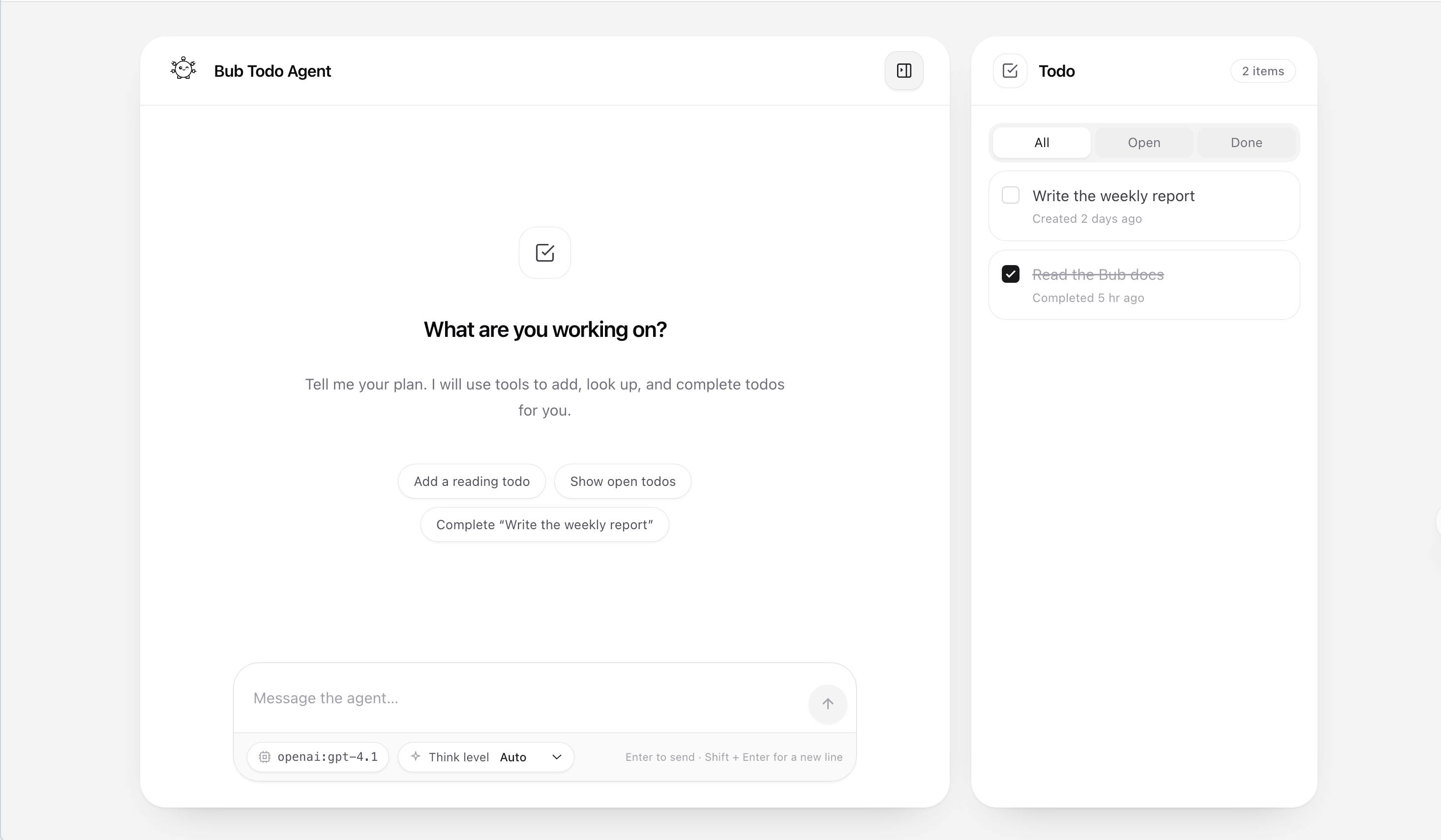
Enjoy!